Forward Contact Form 7
Messages to WhatsApp
Stop losing Contact Form 7 messages in your inbox. Activate the integration from the Birtıkta panel in one click; pick your country code, enter your number, and every incoming form message lands on WhatsApp instantly.
Your form messages, now on WhatsApp
Contact Form 7 is the most widely used contact form plugin for WordPress. Birtıkta works with Contact Form 7 to deliver every submission from your site to the channel you choose. With WhatsApp forwarding, you see customer requests instantly on your phone and respond without delay.
Contact Form 7 WhatsApp integration in 3 steps
No complex code or extra plugin. Open site settings in the Birtıkta panel, enable the integration, and enter your number.
Enable the integration
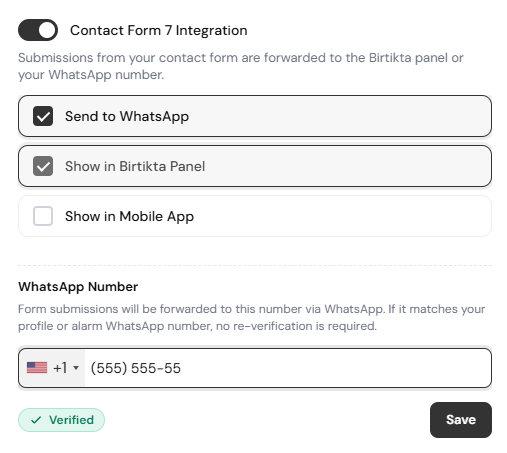
In the Birtıkta panel, activate the Contact Form 7 integration from the relevant site's site settings.
Choose "Send to WhatsApp"
Pick the channel your messages go to. When you select Send to WhatsApp, a number field opens; choose the country code and type your phone number.
Messages arrive automatically
After this setting, every form message is forwarded on our side to WhatsApp automatically.
Send your messages to any channel
In the integration settings you can choose more than one destination for incoming form messages. You can also use them together.
Enter your number when you pick "Send to WhatsApp"
When you select WhatsApp forwarding, a phone number field opens. You select the country code from a list and then type your number.
After this setting, every Contact Form 7 submission your visitors complete is automatically forwarded on our side to the WhatsApp number you set. No extra steps required.
+44Never miss a form message
Avoid requests getting lost or noticed too late in your inbox. With WhatsApp, get back to your customers within minutes.
Instant notifications
The message lands on your WhatsApp the moment the form is submitted. No need to be at your computer.
Faster responses
Reply to customer requests within minutes and increase your sales and satisfaction rates.
Multi-site support
Forward the form messages of all your Birtıkta-connected sites to a single WhatsApp number.
No extra plugin
You only need Contact Form 7 installed on your site. Birtıkta manages the forwarding flow.
Frequently Asked Questions
Yes. In the Birtıkta panel, enable the Contact Form 7 integration from the site settings and choose "Send to WhatsApp". Enter your country code and number, and every incoming form message is automatically forwarded to WhatsApp.
No. You only need Contact Form 7 installed and active on your site. No additional plugin is required for WhatsApp forwarding; the entire flow is handled by Birtıkta.
In the "Send to WhatsApp" option you can select the country code from a list and then enter your phone number. International numbers are supported.
Yes. Besides forwarding to WhatsApp, you can also send messages to the Birtıkta panel and the mobile app. You can use these options together.
Yes. You can manage the Contact Form 7 messages of all WordPress sites connected to Birtıkta and forward them to any WhatsApp number you choose.
Yes. Contact Form 7 keeps working in its own flow; Birtıkta additionally forwards these messages to WhatsApp, the panel or the mobile app.